This section contains information that applies to the entire district. There are four tabs: General, Contact Info, Release Categories and Scanning.
General Tab
Unit Code and Unit Name are established under licensing and cannot be edited here.
SCHOOL FISCAL YEAR
Contact Info Tab
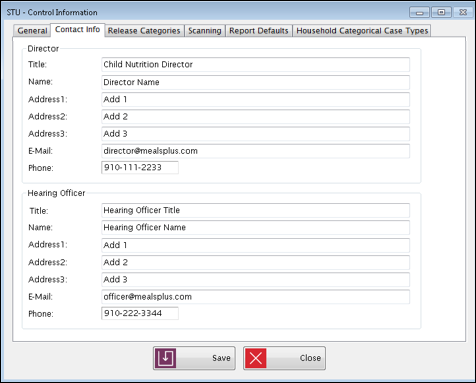
This tab is used to enter the contact information for the Director and Hearing Officer.
Release Categories Tab
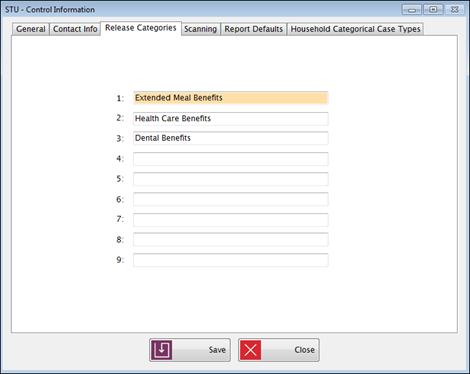
This section is optional. It can be used if your application form has a place where the family can give permission to release information to outside agencies.
Scanning Tab
This sets your preferences for handling duplicates when scanning applications.

Report Defaults Tab
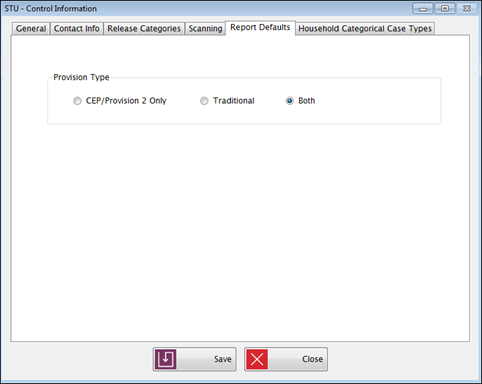
This sets your default preference for some reports. This setting is for the following reports:
Household Categorical Case Types
This is where you can add case types to be used on student applications.
Household Categorical Case Types added here will display for selection on the Student Information screen for New or Existing Applications.
Medicaid, TANF, SNAP, FDPIR, and Other are pre-added by Meals Plus and will always be set to Free Benefit Level.
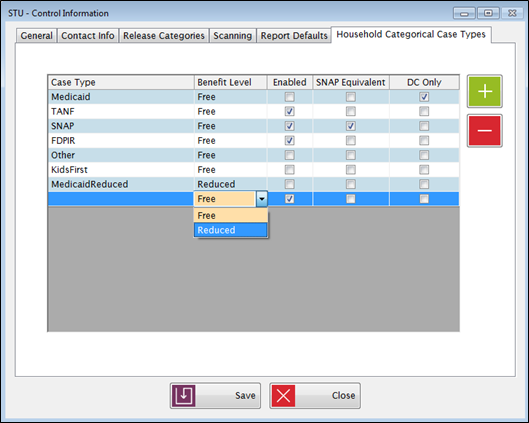
Set a district-created case type to SNAP Equivalent and/or DC Only by checking the box(es) in the SNAP Equivalent and/or DC Only columns.
Medicaid, TANF, and FDPIR cannot be set to SNAP Equivalent.
TANF and FDPIR cannot be set to DC Only.
Medicaid will automatically be checked DC Only.
A reduced Benefit Level cannot be SNAP Equivalent.
©2019 EMS LINQ, Inc.
Student Eligibility, revised 7/2018